
This tutorial shows how to do a turntable animation in Blender.
Blender 3D has changed considerable from 2.4x to 2.5X series. For the 2.4X series of this powerful 3D graphic suite, we can use Cyclic Extend Mode in the IPO editor to make cyclical 3D animation such as a Turn Table. However, much have changed for the 2.5 series or later versions of Blender.
For Blender 2.5 and higher versions, cyclical Turntable animation makes use of linear interpolation and cyclical F-curve modifier. Below video is an example of Turntable animation done using Blender 2.5.
In Blender 2.5, the IPO editor of 2.4x have been expanded by the new Graph editor and Dopesheet.
Below illustrates the basic steps for creating a turntable 3D animation for Blender 2.5 and higher. For this example, we will animate the default cube in a Blender session start up.
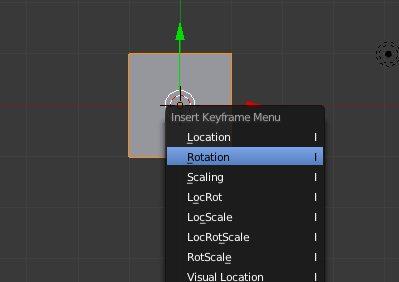
1. Firstly, select the object to be animated. In the example below, the selected object is a cube. In the first frame, insert keyframe by pressing the I-key on the keyboard. From the Insert Keyframe Menu, select Rotation as the option.
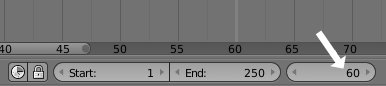
2.Using the Timeline, go to the next keyframe frame. In this case, it is frame number 60.
3.Press the R key to rotate the object that is to be animated.
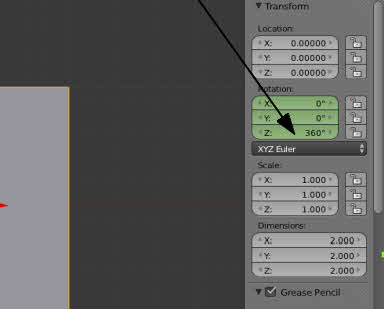
4.Type 360, press Enter key. This is to rotate the cube at the Z-axis for 360 degree.
5.Make sure the Rotation is reflected at the Transform Panel. If not, manually key in the number at the right-side panel of the 3D view. This is as indicated in the screenshot shown below.
6.Now, press I key on the keyboard to insert another keyframe (which is, in our case at frame 60)
7.From the Insert Keyframe Menu option, select Rotation.

We have come to the end of part 1. Hope that the steps have been clearly illustrated so far.
>> Click here to go to part 2 of Turntable animation tutorial.
Today we have newer 3D graphic suite to make things further simpler. But a great share for someone who has just begun. Kudos.