
In this article, we will show how painted Sculptris models can be brought into Blender 2.5 with full textures intact.
In case you do not know what is Sculptris, it is a very cool (and yet free) 3D sculpting program that works similarly to programs such as Mudbox and Zbrush. Sculptris is highly intuitive to use and allows a newcomer to easily create complex organic models without much training. By the way, if you do not know Blender itself has very good sculpting capability. Coupled with the 3D Printing knowledge, it is possible to create physical models.
After you are done with the modeling and painting within Sculptris, export the texture map. Next, export your model as a Wavefront OBJ file either by clicking the export OBJ button or pressing the CTRL and E-keys.

In Blender, import the model as Wavefront OBJ format as illustrated below.
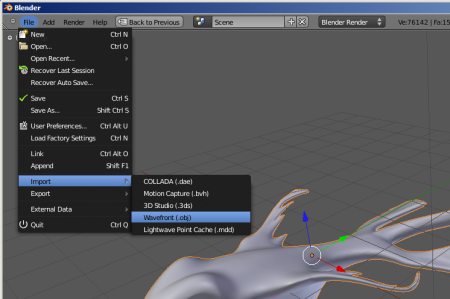
The model should come in nicely. However, we will need to assign the texture map correctly onto the model.
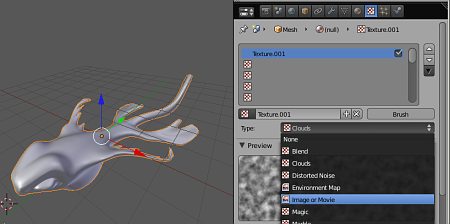
With the model selected, go to the Texture panel. In case, you don’t know where the texture panel is, it is accessed by clicking on the checker-patterned square icon.
Click the ‘+’ symbol to add a new texture. For texture type, select ‘Image or Movie’. This is as shown below.
very nice !!!
thank you